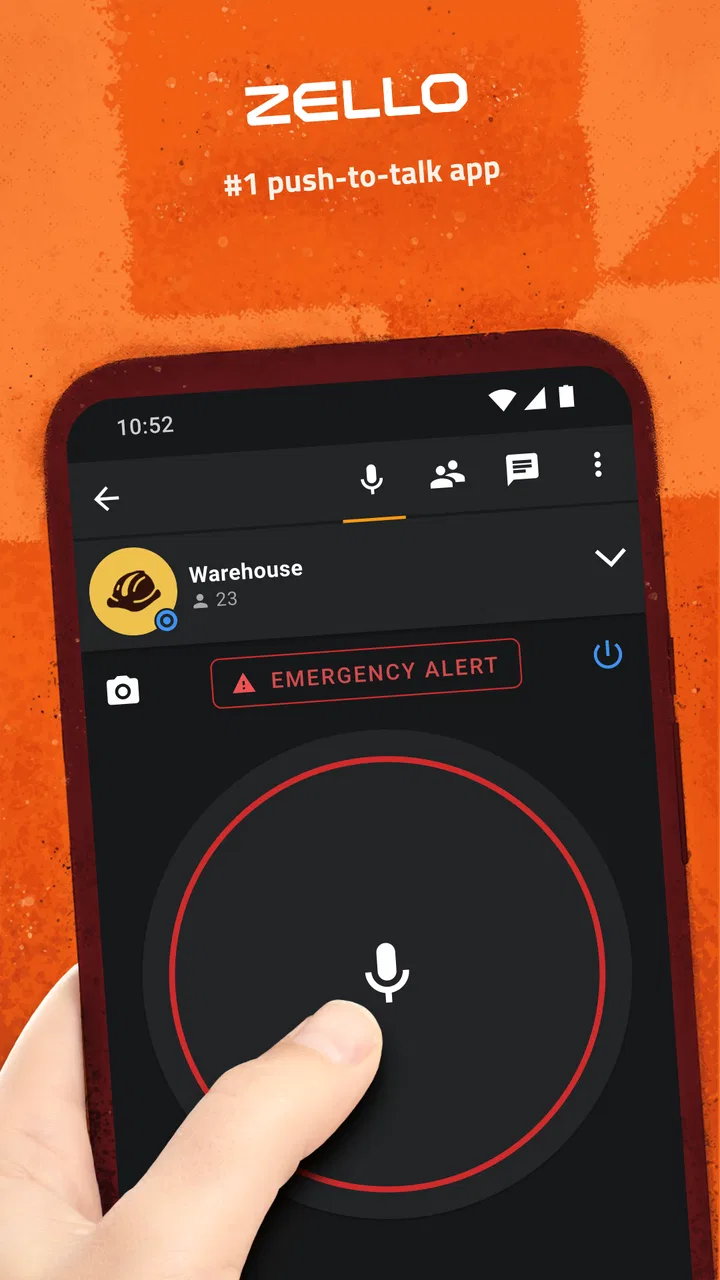
Zello PTT Walkie Talkie
- 4.2
- Rating
- 100.00M
- Installs
- Free
- Price

 Analysis by App-foxy
I found Zello PTT Walkie Talkie most useful when a household needs quick voice coordination without turning every small message into a phone call. It is a communication app from Zello Inc, built around push-to-talk conversations rather than long text threads. In my experience, that difference matters: you press to speak, release when finished, and the other person can respond in a rhythm that feels closer to a walkie-talkie than to a conventional messenger.
The app is free to install and is rated for Everyone, which makes it easy to consider for shared household use. Still, an age label should not be mistaken for a complete family-safety plan. Whether it works well for your home depends on who uses the device, whose account is signed in, and how carefully you keep personal conversations separate from shared coordination. I would recommend it most to people who value fast voice contact and can agree on simple usage rules.
How Zello fits into everyday household communication
A realistic example is a busy home where one person is preparing dinner, another is outside bringing in groceries, and someone else is moving between rooms. Typing a message can be inconvenient, while a normal call may feel excessive for a short update. With a push-to-talk app, a quick voice message can communicate “I’m at the door” or “please bring the keys” without requiring a full conversation.
You May Also Like

 Blood Strike: 2.5 Anniversary
Blood Strike’s Loadouts Turn Every Drop Into a Tactical Gamble
A close look at Blood Strike’s custom loadouts: how fast access to signature weapons reshapes its battle royale rhythm, rewards preparation, and narrows the gap between fights.

 Pandora - Music & Podcasts
Pandora’s Music Is Easy to Start, but Harder to Recover
Pandora’s strength is its low-effort path from a seed to a station. Its weak spot is how much confidence it asks you to place in connection, setup, and quiet recovery.

 8 Ball Pool
 Is Built on Rivalries, Rematches, and Routine
A close look at the rivalries, rematches, shared routines, and unanswered safety questions that turn a quick pool match into a persistent mobile community.

 Samsung Music
’s Quiet Strength Is Playing What You Already Own
Its reach comes less from spectacle than from dependable access to a personal library. That simplicity is both the app’s strongest retention engine and its ceiling.

 AccuWeather: Weather Radar
AccuWeather Review: A Quick, Clear Forecast for Everyday Decisions
For everyday plans, the best forecast is the one you can understand quickly. AccuWeather makes rain timing, radar, and local conditions easy to act on, with a few trade-offs.

 Hill Climb Racing
Why Hill Climb Racing Still Turns Crashes Into One More Run
A tiny car, a bumpy hill and one more upgrade: Hill Climb Racing keeps resurfacing because its simple chaos makes every near-miss feel personal.
More From Our News Desk
View All News


That workflow is the central appeal. Zello PTT Walkie Talkie does not try to replace every kind of communication. It is better suited to short, practical exchanges than to sharing photos, writing detailed plans, or holding a private conversation that needs a conventional call interface. I found the voice-first approach especially useful when my hands were occupied or when a typed message would have taken longer than speaking.
For a shared device, the advantage is also the limitation. A tablet or spare phone can become a household coordination point, but it is not automatically a neutral public notice board. If different people use the same signed-in account, conversations and contact choices can become confusing. If each person has a separate account, switching between users may add friction. The best arrangement depends on whether the device is assigned to one person or intentionally treated as a common household tool.
I would avoid treating the app like a baby monitor, emergency guarantee, or replacement for local emergency services. A push-to-talk service depends on the device being usable and the connection being available. For ordinary coordination, that is reasonable. For urgent situations, I would use the appropriate emergency option first and treat Zello as a convenience rather than a safety promise.
What the push-to-talk design changes
The half-duplex style encourages concise messages. You generally take a turn, speak, and let the other person answer. That can reduce the back-and-forth typing found in group chats, but it also requires a little discipline. If several people speak at once or everyone sends long recordings, the quick walkie-talkie feeling disappears.
My practical advice is to agree on a simple household habit: say the person’s name first, keep routine updates brief, and avoid sending sensitive information where other household members may hear it. This is not a complicated technical trick, but it makes the app much easier to live with. The strongest benefit appears when everyone understands that the channel is for coordination, not for narrating every detail of the day.
Another useful distinction is between availability and attention. A person may be connected to the app without being ready to answer immediately. A missed response should not automatically be interpreted as ignoring someone. For a household, that means combining the app with a clear backup habit, such as a normal call for something time-critical.
Setting up a shared device without blurring identities
Before handing the app to several people, I would decide whether the device is genuinely shared or simply borrowed. On a genuinely shared phone or tablet, the account boundary matters more than the installation itself. Everyone should know which identity is active, whose conversations may appear, and who is responsible for changing or checking the contact setup.
Using one account for multiple people can make a household channel feel simple at first, but it weakens personal boundaries. A reply may appear to come from the account even though another family member sent it. That can create misunderstandings, especially when someone assumes they are speaking privately to one person. Separate accounts offer clearer identity, though they require more organization when several people use the same hardware.
I would also make the device’s purpose explicit. If it belongs to a child, the child should know whether it is for household coordination only or for broader communication. If it belongs to everyone, adults should agree before adding contacts or changing how the channel is used. These are household rules rather than built-in family controls, and that distinction is important: the app does not remove the need for supervision and trust.
When setting up a shared device, I would start with one small use case instead of inviting everyone immediately. For example, use it for arrival updates between two people for a few days. This reveals whether the device is loud enough, whether people remember to check it, and whether the account arrangement causes confusion. Once that routine feels natural, expanding the group is less disruptive.
The current version is 7.2.0, and the minimum operating system is Android 7.0. That makes the app relevant to some older Android devices, which can be helpful when a household repurposes a spare phone. Even so, an older device may be less comfortable for frequent voice use if its battery, speaker, or microphone is worn. I would test the actual device rather than assuming that compatibility alone means a good experience.
Coordinating rooms, errands, and arrivals
Zello works best when the message has a clear purpose. In a household, that might be coordinating who is collecting a package, telling someone that a visitor has arrived, or asking whether a shared vehicle is available. These are small moments, but they are exactly where a voice shortcut can feel more natural than opening a traditional chat, finding the right thread, and typing.
For errands, I like the idea of using short status updates instead of a running conversation. “Leaving now,” “at the store,” and “back in ten minutes” are easy to understand when each message has a clear speaker and purpose. The trade-off is that voice messages are less searchable and less scannable than written notes. If the household needs a lasting shopping list or a detailed schedule, a text-based tool remains better.
For room-to-room coordination, the app can reduce shouting across the home. That is convenient in a large house or when someone is working in a noisy area. However, it should not become an excuse to interrupt people constantly. I found the most sensible pattern to be using it for a specific request, then switching back to normal conversation once the task is complete.
One non-obvious advantage is that speaking can preserve context that a very short text might lose. Tone and emphasis may make it clearer whether a request is urgent, casual, or simply informational. The disadvantage is equally real: tone can be misunderstood, and anyone nearby may hear the message. For private matters, I would choose a direct call or an in-person conversation instead.
How it compares with ordinary calls and chat apps
Compared with a standard phone call, Zello is less formal and often quicker for one-line updates. You do not need to maintain a continuous conversation just to communicate a small change. A call remains better when both people need to discuss a complicated issue, when the exchange is sensitive, or when a reliable two-way conversation matters more than speed.
Compared with text messaging, the app is more convenient when typing is awkward. Voice can also be more expressive and faster for someone who dislikes keyboards. Text wins for addresses, names, times, lists, and anything that needs to be checked later without replaying audio. My rule would be simple: use Zello for movement and immediate coordination; use text for records and precise details.
Compared with a group chat, the push-to-talk structure can feel less cluttered when the household only needs brief updates. It can also become noisier if several people send messages without a clear order. Group chats are usually stronger for photos, documents, planning, and asynchronous discussion. Zello is the more focused choice when the main need is quick voice contact.
There is also a social difference. A chat app encourages people to read when convenient, while a walkie-talkie-style channel invites a faster response. That can be helpful during an active task, but it may create pressure to answer immediately. I would set expectations early, especially for teenagers, remote workers, or anyone who needs uninterrupted time.
Age, trust, and sensible household boundaries
The Everyone rating makes the app approachable for a broad audience, but the real question is not only whether someone can operate it. It is whether they understand who can hear a message, which account they are using, and when a voice update should remain private. Younger users may need a simple explanation that a convenient channel is still a communication channel with consequences.
I would not give a shared device an open-ended role without discussing contacts first. A household should decide who is allowed to communicate through it and what kinds of messages are appropriate. If the device is used by a child, an adult should remain involved in the account arrangement and review the routine from time to time. That is especially important when the same hardware passes between family members.
Trust also includes respecting quiet hours. The app’s usefulness can turn into annoyance if people treat every thought as a broadcast. A household agreement about when to use it, when to wait, and when to make a normal call can prevent most of the friction. I prefer a clear rule that urgent means genuinely time-sensitive, not merely convenient.
Privacy deserves practical attention too. Voice is harder to conceal than text, and a speaker may be audible to guests, coworkers, or other people in the room. I would avoid sharing passwords, financial details, medical information, or private family disagreements through a casual shared channel. The app can support coordination without becoming the household’s private archive.
Performance expectations and the cost question
The app is free, which makes trying it low-risk for a household that already owns compatible devices. Its broad reach is reflected in more than one hundred million installs, while the average rating is around 4.2 from roughly 778 thousand ratings. Those figures suggest that the basic concept has found a substantial audience, but they do not guarantee that every family will enjoy the same workflow.
There are in-app purchases ranging from about eight dollars to roughly seven hundred fifty dollars per item. That range is worth noticing before allowing purchases on a shared device. I would review the purchase settings on the device and make sure everyone knows whether the app is being used strictly as a free communication tool. A free download does not necessarily mean every optional transaction is irrelevant to a household budget.
For a simple family channel, I would begin with the free experience and judge it by routine rather than by novelty. Does everyone remember to check it? Are messages short enough? Does the shared account create confusion? If the answer to those questions is no, spending money is unlikely to solve the underlying problem. The main value comes from fitting the app into a clear communication habit.
Device quality matters more than many new users expect. A weak microphone, a quiet speaker, or a phone buried in a bag can make a fast voice system frustrating. I would test it from the places where it will actually be used, such as a hallway, garage, kitchen, or front entrance. A setup that works perfectly at a desk may be less useful when someone is moving around.
Who should use it, and who should skip it
I think Zello PTT Walkie Talkie is a good match for households that regularly exchange short voice updates and want something lighter than a phone call. It is also appealing for people who find typing slow, awkward, or distracting. A shared spare device can make sense when its identity and purpose are clearly defined.
I would be more cautious about recommending it to a household that needs detailed written records, extensive media sharing, or strong separation between personal conversations. A conventional messaging app may be better for school schedules, shopping lists, documents, and information that must remain easy to search. A normal call is better for emotional or complicated discussions.
It is also not the right choice if everyone expects silent, asynchronous communication. Voice updates can interrupt, and the walkie-talkie style only feels efficient when users accept the idea of taking turns. If a family already has a group chat that handles its needs without confusion, adding another channel may create more places to check rather than making communication simpler.
My household verdict
After looking at it as a household tool rather than merely a quick messenger, I see a focused app with a clear strength: it makes short voice coordination feel immediate. That can be genuinely useful for arrivals, errands, room-to-room requests, and temporary shared-device routines. The experience is uncomplicated when everyone knows who is using the account and what the channel is for.
My reservations are mostly about boundaries, not the basic idea. Shared identities can blur responsibility, voice messages are not ideal for precise records, and the convenience may encourage interruptions. The Everyone rating is reassuring for general accessibility, but it does not replace adult judgement about contacts, privacy, or appropriate use.
I would recommend trying it with one defined household routine before making it a permanent communication layer. Keep messages purposeful, use ordinary calls for sensitive or urgent matters, and choose text when the information needs to be saved and checked later. With those limits, Zello PTT Walkie Talkie can be a practical addition for families who want fast voice coordination without a full phone call.
Overall, I see it as a specialized communication app rather than an all-purpose replacement for messaging. Its free entry point, established audience, and push-to-talk design make it easy to test, while the account and privacy decisions determine whether it remains pleasant in daily use. For the right household, that focused approach is exactly what makes it worthwhile; for everyone else, a regular chat app may be the calmer and more flexible choice.
FAQs for Zello PTT Walkie Talkie
01What is Zello PTT Walkie Talkie and how does it work?
Zello PTT Walkie Talkie is a mobile app that transforms your smartphone into a walkie-talkie. It uses push-to-talk (PTT) technology to allow users to communicate in real-time over Wi-Fi or cellular data. Unlike traditional walkie-talkies, Zello operates on a global scale, enabling communication across long distances without the need for special hardware.
02Is Zello PTT Walkie Talkie free to use?
Zello PTT Walkie Talkie offers a free version for personal use, which includes most of its features. However, there is also a Zello for Work version that requires a subscription. This paid version is designed for businesses and includes additional features such as more robust security options, management tools, and priority support.
03What platforms is Zello PTT Walkie Talkie available on?
Zello PTT Walkie Talkie is available for both Android and iOS devices. It can be downloaded from the Google Play Store and the Apple App Store. Additionally, Zello offers desktop applications for Windows and Mac, allowing users to communicate across various devices seamlessly.
04How secure is communication on Zello PTT Walkie Talkie?
Zello PTT Walkie Talkie uses end-to-end encryption for its communications, ensuring that conversations are private and secure. For users of Zello for Work, additional security features are available, including secure channels and user authentication, making it suitable for sensitive communications in professional environments.
05Can Zello PTT Walkie Talkie be used offline?
Zello PTT Walkie Talkie requires an internet connection to function, as it relies on Wi-Fi or cellular data to transmit voice messages. Without an internet connection, the app will not be able to send or receive communications. Therefore, it cannot be used offline like traditional walkie-talkies.
Pros
- Instant voice communication with no delay.
- Low data usage
- ideal for limited plans.
- Works on Wi-Fi and mobile networks.
- Supports group channels for broadcasts.
- User-friendly interface and easy setup.
Cons
- Requires internet connection to function.
- Limited offline features available.
- Ads can be intrusive at times.
- Some privacy concerns with location sharing.
- Battery drain with prolonged use.

Zello PTT Walkie Talkie
Gallery